YalerTunnel in depth
How to configure the YalerTunnel daemon, including options not mentioned in device specific tutorials.
This app note works for Aduino Yún, BeagleBone, Raspberry Pi and other Linux devices. Found a bug? Let us know.
Installing YalerTunnel
- Follow the device specific tutorial to install YalerTunnel
Install YalerTunnel on Arduino Yún, BeagleBone, Raspberry Pi or another device
- If your device is not supported yet, porting might be an option. Get in touch.
- To port YalerTunnel yourself, get the source code at https://github.com/yaler/YalerTunnel2
Setting up remote Web access to your device
How to set up YalerTunnel to remotely access a Web server listening on localhost port 80 (or 443).
- Follow the device specific tutorial to enable Web access
Enable Web access on Arduino Yún, BeagleBone, Raspberry Pi or another device
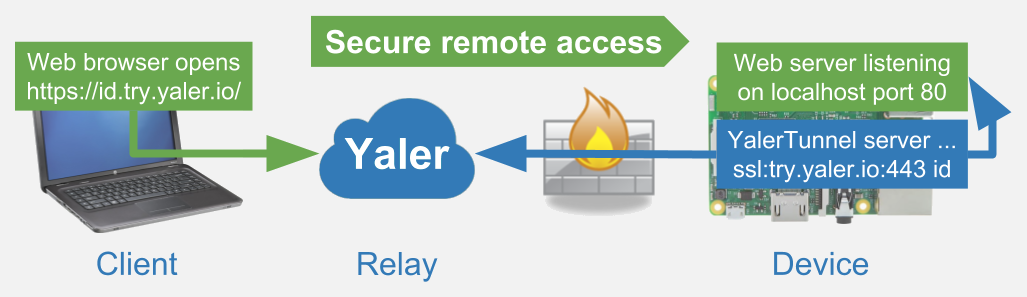
- Run YalerTunnel in server mode and make sure to set the local port to 80, enable TLS and use your relay domain
$ ./yalertunnel server 127.0.0.1:80 ssl:try.yaler.io:443 RELAY_DOMAIN
If your local Web server uses TLS, even with a self-signed certificate, type$ ./yalertunnel server ssl:127.0.0.1:443 ssl:try.yaler.io:443 RELAY_DOMAIN
Done. The resulting setup looks like this (assuming RELAY_DOMAIN = id):
Setting up remote SSH access to your device
How to set up YalerTunnel to remotely access a SSH daemon listening on localhost port 22.
- Follow the device specific tutorial to enable SSH access
Enable SSH access on Arduino Yún, BeagleBone, Raspberry Pi or another device
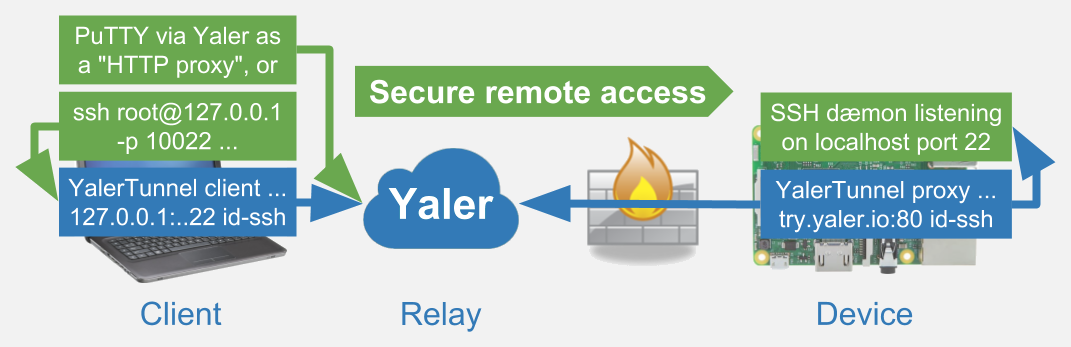
- Run YalerTunnel in proxy mode and make sure to set the local port to 22 and use your relay domain
$ ./yalertunnel proxy 127.0.0.1:22 try.yaler.io:80 RELAY_DOMAIN
- On the client side, use Putty for direct access or set up YalerTunnel in client mode and use ssh.
Done. The resulting setup looks like this (assuming RELAY_DOMAIN = id-ssh):
Accessing more than one service
How to set up multiple YalerTunnel instances.
Setting up Web and SSH access at the same time
How to set up YalerTunnel to access a Web server listening on localhost port 80 and SSH on port 22.
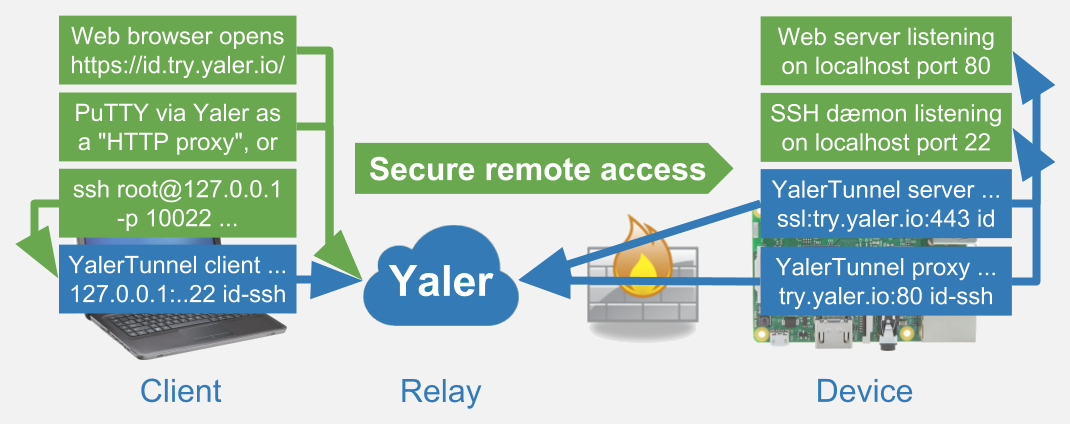
- To enable Web and SSH access at once, set up two YalerTunnel instances with separate relay domains.
- Web: Run YalerTunnel in server mode and make sure to set the local port to 80, enable TLS and use your relay domain
$ ./yalertunnel server 127.0.0.1:80 ssl:try.yaler.io:443 RELAY_DOMAIN_1
- SSH: Run YalerTunnel in proxy mode and make sure to set the local port to 22 and use your relay domain
$ ./yalertunnel proxy 127.0.0.1:22 try.yaler.io:80 RELAY_DOMAIN_2
Done. The resulting setup looks like this (assuming RELAY_DOMAIN_1 = id and RELAY_DOMAIN_2 = id-ssh):
Setting up Web and WebSocket access at the same time
How to set up YalerTunnel to access a Web server on port 80 and a WebSocket service on port 8080.
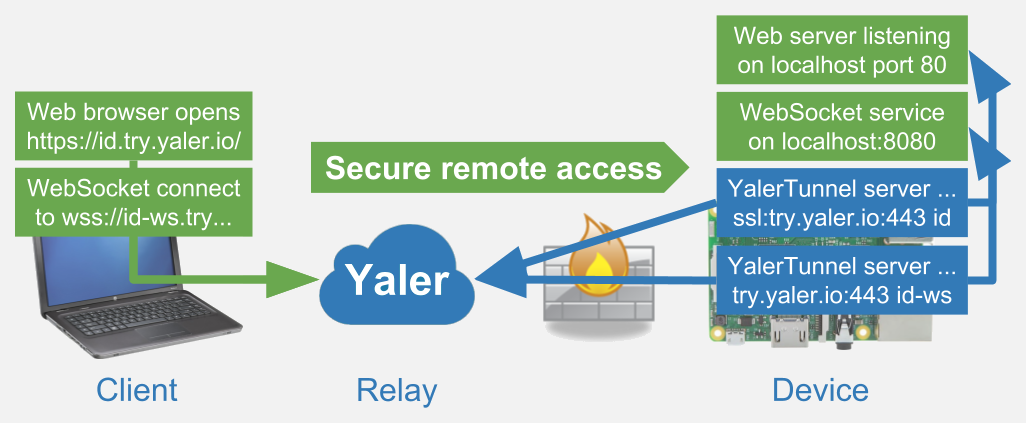
- To enable Web and WebSocket access at once, set up two YalerTunnel instances with separate relay domains.
- Web: Run YalerTunnel in server mode and make sure to set the local port to 80, enable TLS and use your relay domain
$ ./yalertunnel server 127.0.0.1:80 ssl:try.yaler.io:443 RELAY_DOMAIN_1
- WebSocket: Run YalerTunnel in server mode and make sure to set the local port to 8080 and use your relay domain
$ ./yalertunnel server 127.0.0.1:8080 ssl:try.yaler.io:443 RELAY_DOMAIN_2
Done. The resulting setup looks like this (assuming RELAY_DOMAIN_1 = id and RELAY_DOMAIN_2 = id-ws):
Serving multiple clients in parallel
How to set up YalerTunnel to handle more than one client request at once.
The -min-listeners option
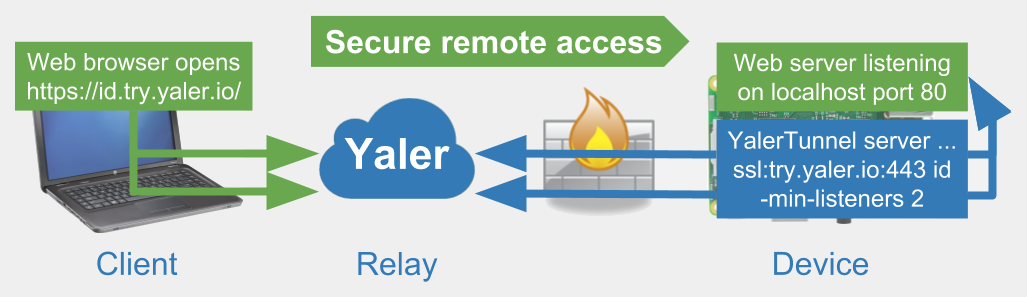
YalerTunnel supports parallel connections throught the -min-listeners option.
- YalerTunnel (in server or proxy mode) opens a new connection every time a client connects.
- This means that opening multiple connections via the Yaler relay in series is supported by default.
- However, modern Web browsers open several connections in parallel, e.g. Chrome opens up to 6.
- This can lead to Web pages served via Yaler containing broken pictures or failing AJAX requests.
- Setting the -min-listeners N option to N > 1 allows you to serve multiple connections in parallel.
- As YalerTunnel does not yet support multiplexing, this leads to additional keep-alive traffic.
- A rough estimate for Yaler protocol keep-alive traffic is 10 MB per connection per month.
- Consider the impact on cost sensitive connectivity options (e.g. 3G with a limited plan).
- Also note that depending on your hardware the number of connections can be limited.
- To save resources on the relay, try to keep -min-listeners as small as possible.
The resulting setup looks like this (assuming -min-listeners is set to 2):
Understanding YalerTunnel modes
How YalerTunnel works in server, proxy or client mode. For additional details, see the Yaler protocol documentation.
Server mode
YalerTunnel is used in server mode to enable access HTTP-aware services (e.g. a Web server or WebSocket service).
- In server mode, the YalerTunnel daemon acts as a bridge.
- It connects to the Yaler relay using the specified relay host and RELAY_DOMAIN.
- It keeps the connection open by sending keep alive packets to the relay.
- It forwards traffic from the Yaler relay to the specified local service.
- Incoming bytes (e.g. a GET request) are forwarded as sent by the client.
- The response is sent back to the relay exactly as sent by the service.
Proxy mode
YalerTunnel is used in proxy mode to enable access to TCP-based services (e.g. a SSH or VNC daemon).
- In proxy mode, the YalerTunnel daemon acts as a bridge.
- It connects to the Yaler relay using the specified relay host and RELAY_DOMAIN.
- It keeps the connection open by sending keep alive packets to the relay.
- It forwards traffic from the Yaler relay to the specified local service.
- The initial CONNECT request sent by the client is absorbed.
- Subsequent bytes are forwarded exactly as sent by the client.
- The response is sent back to the relay exactly as sent by the service.
Client mode
YalerTunnel is used in client mode to provide a local service endpoint, if a TCP-based client does not support HTTP proxies.
- In client mode, the YalerTunnel daemon acts as a local service.
- It listens for incoming local connections on the client (e.g. SSH on port 10022).
- It forwards traffic to the Yaler relay, using the specified rleay host and RELAY_DOMAIN.
- It prepends each new connection with a CONNECT request, as the Yaler relay expects HTTP.
- The response is relayed to the local client exactly as sent by the remote service.
Need more relay domains or got any other questions? Get in touch.
 This work by Yaler GmbH is licensed under a Creative Commons Attribution-ShareAlike 4.0 International License.