Node.js WebSocket server
How to set up a simple Node.js WebSocket server on your laptop or embedded device and access it securely, to provide a real time UI.
This app note works for BeagleBone, Mac OS X, Raspberry Pi and other Linux devices running Node.js. Found a bug? Let us know.
Installing the ws Node.js WebSocket library
- Open a shell on your device, or type
$ cd ~ - Create a nodejs-websocket-server directory
$ mkdir nodejs-websocket-server
$ cd nodejs-websocket-server
- Download and save the ws library with
$ npm install --save ws
Setting up remote Web access to your device
- Install YalerTunnel and enable Web access via Yaler
Install YalerTunnel on BeagleBone, Mac, Raspberry Pi or another device
- Make sure to set the local port to 8080, enable TLS and use your relay domain
$ ./yalertunnel server 127.0.0.1:8080 ssl:try.yaler.io:443 RELAY_DOMAIN
- Done. Now set up the echo server or the stat server example.
Echo server
A simple WebSocket server returning the message it receives.
Creating a Node.js WebSocket server
- Create a file named echo-server.js, e.g. with
$ cd ~/nodejs-websocket-server
$ sudo nano echo-server.js
Enter the following Node.js codevar WebSocketServer = require('ws').Server , wss = new WebSocketServer({ port: 8080 }); wss.on('connection', function connection(ws) { ws.on('message', function incoming(message) { console.log(message); ws.send(message); }); });Save changes with CTRL-X, then Y, then RETURN.
- Start the Node.js WebSocket server with
$ node echo-server.js
Using the WebSocket.org echo client
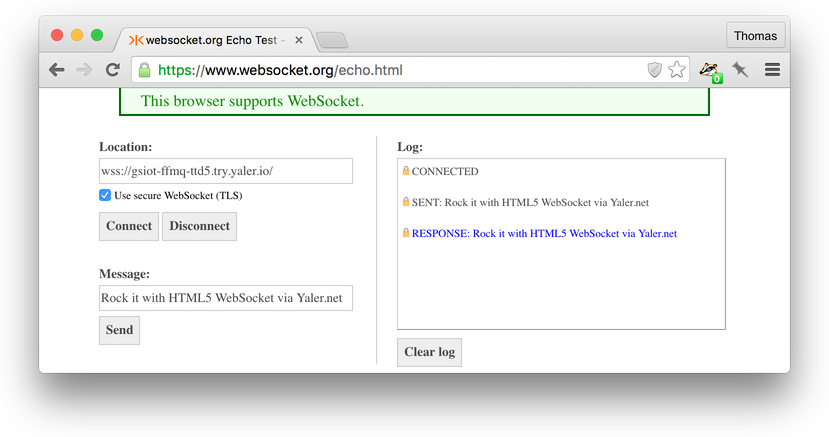
- Open the WebSocket.org echo client https://www.websocket.org/echo.html
- Set location to
wss://RELAY_DOMAIN.try.yaler.io/and check Use secure WebSocket. - Click Connect, type a message and click Send to send a WebSocket request.
- Done. You should now see the echo of your message.
Stat server
A combined Web/WebSocket server pushing server statistics, as found in ws examples.
Creating a combined Web/Websocket server
- Download and save the express package
$ cd ~/nodejs-websocket-server
$ npm install --save express
- Create a file named stat-server.js, e.g. with
$ sudo nano stat-server.jsEnter and save the following Node.js code// (c) 2011 Einar Otto Stangvik, MIT License var WebSocketServer = require('ws').Server , http = require('http') , express = require('express') , app = express(); app.use(express.static(__dirname + '/public')); var server = http.createServer(app); server.listen(8080); var wss = new WebSocketServer({server: server}); wss.on('connection', function(ws) { var id = setInterval(function() { ws.send(JSON.stringify(process.memoryUsage()), function() { /* ignore errors */ }); }, 100); ws.on('close', function() { clearInterval(id); }); });
Creating a simple WebSocket client Web page
- Create a subdirectory public with a file named index.html, e.g. with
$ mkdir public
$ sudo nano public/index.html
Enter and save the following HTML<!DOCTYPE html><!-- (c) 2011 Einar Otto Stangvik, MIT License --> <html> <head> <script> function updateStats(memuse) { document.getElementById('rss').innerHTML = memuse.rss; document.getElementById('heapTotal').innerHTML = memuse.heapTotal; document.getElementById('heapUsed').innerHTML = memuse.heapUsed; } var host = window.document.location.host.replace(/:.*/, ''); var ws = new WebSocket('wss://' + host + '/'); ws.onmessage = function (event) { updateStats(JSON.parse(event.data)); }; </script> </head> <body> RSS: <div id='rss'></div><br> Heap total: <div id='heapTotal'></div><br> Heap used: <div id='heapUsed'></div><br> </body> </html>
Accessing the combined Web/WebSocket server remotely
- Start the Node.js Web/WebSocket server with
$ node stat-server.js - To access the Web/WebSocket server, visit the URL
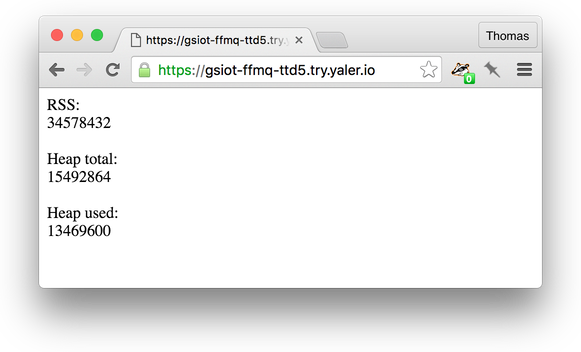
https://RELAY_DOMAIN.try.yaler.io/e.g. for the relay domain gsiot-ffmq-ttd5 go tohttps://gsiot-ffmq-ttd5.try.yaler.io/
- Done. You should now see a real time stats Web page served by your device.
Troubleshooting
How to fix common issues.
If node or npm
command not founddownload and install Node.js from https://nodejs.org/ or, on the lite version of Raspbian, type$ wget http://node-arm.herokuapp.com/node_latest_armhf.deb $ sudo dpkg -i node_latest_armhf.deb $ node -v
- If npm says
not ok code 0try sudo npm ... - The
DISCONNECTEDis expected, as idle client connections are closed after 30 seconds. - The
Error: listen EADDRINUSEhappens if another server is already running on this port. - If an issue persists, get help.
Need more relay domains to serve Web and WebSocket requests on separate ports? Get in touch.
 This work by Yaler GmbH is licensed under a Creative Commons Attribution-ShareAlike 4.0 International License.