Access your device with FileZilla
From anywhere, via the Yaler relay.
Prerequisites
A device running an SSH service. To set up your device, see getting started.
Building YalerTunnel
How to build YalerTunnel on the client computer in order to enable tunneling SSH (and SFTP).
- Make sure JDK6 (or later) is installed and your PATH environment variable contains the JDK's bin directory.
- Download and unzip the YalerTunnel Java source
YalerTunnel.src.zip
- To build YalerTunnel, open a shell, go to the unzipped directory, and type
$ javac YalerTunnel.java - Done.
Running YalerTunnel
How to run YalerTunnel on the client computer to enable SSH (and SFTP) access to your device.
- To start YalerTunnel on a client computer, using your relay domain (e.g. gsiot-ffmq-ttd5), type
$ java YalerTunnel client 127.0.0.1:10022 try.yaler.io:80 RELAY_DOMAIN
Installing FileZilla
Download and install FileZilla Client from https://filezilla-project.org/download.php
Configuring FileZilla
On your client computer, follow these steps to configure FileZilla.
- Start FileZilla Client, open the menu File > Site Manager and click New Site.
Enter a site name, e.g. My Device, then set Host to
127.0.0.1, Port to10022and Protocol toSFTP - SSH File Transfer Protocol.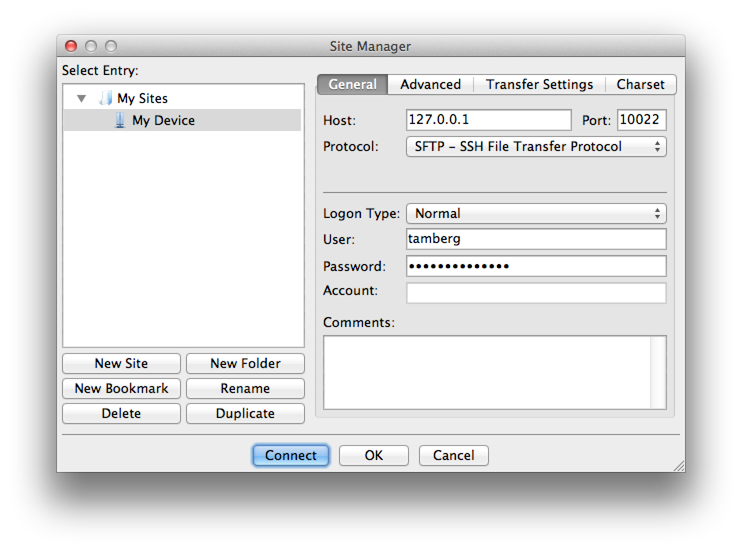
- Set Logon type to
Normal, User to your username and Password to your password and click OK. - Done. FileZilla is now configured to access your device.
Accessing your device
On your client computer, follow these steps to access your device with FileZilla.
- Start FileZilla Client, open the menu File > Site Manager and select your device, e.g. My Device, then click Connect.
If the unknown host key warning appears, click OK.
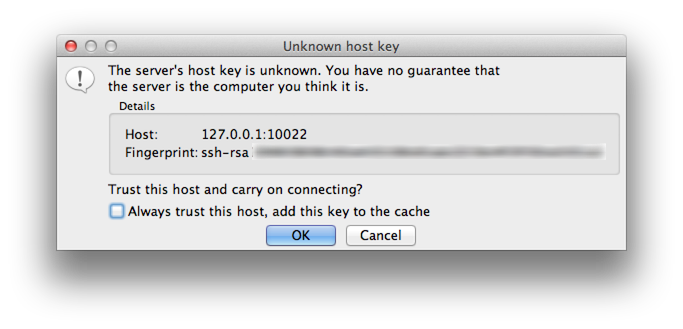
- Done. You should now see the home directory of your device.
Setting SSH ClientAliveInterval
Follow these steps to prevent Error: server unexpectedly closed network connection.
- Open a shell on your device (not on your client computer).
- Add the line
ClientAliveInterval 5to the config (To save your changes press CTRL-X, then Y, then RETURN).$ sudo nano /etc/ssh/sshd_config - Reboot your device to activate the change
$ sudo reboot - Done. FileZilla SFTP connections will now be kept open with keep alive packets.
 This work by Yaler GmbH is licensed under a Creative Commons Attribution-ShareAlike 4.0 International License.